Just converted my PHP / CSS-based Homepage to a Silverlight 2.0 Website

Three weeks ago on a saturday morning I spent my thoughts on what to do with this last free saturday before the football-season starts. Unfortunately my girlfriend was not here, so Tabletennis was no alternative. But there were other possibilities:

  • Play Guitar all day long
  • Play on my new Tenorhorn (I haven't told you that, right?)
  • Put my snowboard under my feet and go up on the mountain
  • Do some muscle-training and try to push up the 105kg more than 12 times
  • Look that Bankjob-DVD
  • ...

... while I was thinking about all that, I surved on www.silverlight.net and then I thought, why not just build my classic homepage (http://www.thomasclaudiushuber.com) totally with silverlight 2.0. And that's what I've done on that morning. :) Yesterday I've finished the page by implementing a php-call from Silverlight to make the contact-formular work (I've no ASP.Net-Support on my Webserver) Take a look at the resulting Silverlight-page on http://www.thomasclaudiushuber.com/pageInSilverlight.

I wanted the result to be as close as possible to the original page, and I think it is. Just with some animations. :-)

It was a rapid development process, but keep in mind that it's also a really simple site. The language switch the php/css site has I left off in the Silverlight-Version, because I went also snowboarding in the afternoon as the snow-height is 63cm on the Belchen, a mountain in the black forest not far away from my home. Instead of the language-switch I've created a "fullscreen"-button (It was a one-liner :-)). I also didn't make a real Dataaccess through WebService-calls. The text-parts are statically inside the XAML-documents. But that wouldn't be a big thing to change.

Through the development process of the Silverlight-page there were different things I knew from WPF and I was missing really extremly in Silverlight. Other things didn't work as good as I thought they should. And at least there were also some good things. Let's take a look at those that are "not so good":

The First "not-so-good": The TextBlock-Element can contain Inline-Elements. In WPF, there are many such Inline-Elements to format the text inside, like Bold, Italic, Run, LineBreak, Hyperlink, Span and so on. In Silverlight there are only two, LineBreak and Run. The one you will be missing most in Silverlight, as you are developing web-applications, is the Hyperlink-Inline. In WPF it allows you to create a hyperlink anywhere in the Text. As Silverlight doesn't have this one, you can't create a hyperlink inside your text out of the box. Silverlight has a HyperlinkButton, but that can't be put inside a TextBlock. So what's the solution? I've used a WrapPanel in combination with multiple TextBlocks and Hyperlinks so that it looks like the Hyperlinks are inside the Text. But in fact they aren't, it just looks so. There are also ThirdParty-Controls available allowing you to write text that contains hyperlinks. I hope the Hyperlink-Inline will be available in Silverlight 3.0

The Second "not-so-good": The TextBlock-Element can't justify the text it contains.

The Third "not-so-good": The Image-Element only supports jpeg and png-files. As the images in the "articles"-Section of my homepage were gif-files, I needed to convert them. Maybe in a future release of Silverlight the Image-Element supports more types. But this point isn't really bad, it's not a big thing to convert images.

The Fourth "not-so-good": If you set the silverlight plugin's params windowsless to true and background to transparent, you can display a custom html-background. I tried that and set the silverlight-plugin to a width of 800. If you use such a html-background, your silverlight-content will flicker when you animate it. That's because the plugin is in an overlay over the website. That wouldn't change in future versions. So the golden rule is not to use animations if the plugin's background is transparent and the plugin is windowless. Or another option is to set the plugins width and height to 100% so that you don't see any other html-contents. The latter I've done.

The last "not-so-good": The Enum-class has no GetNames-Method. To loop through an enum, you'll need reflection. I've done it this way, where Category is my enum:

foreach (FieldInfo fi in typeof(Category).GetFields(
  BindingFlags.Static | BindingFlags.Public))
{
  Category category = 
    (Category)Enum.Parse(typeof(Category), fi.Name, true);
  ...
}

Ok, that's all. There are also more points, e.g. Silverlight doesn't support Triggers and Commands out of the box. But I'll only mention those points that have been important when converting my website to Silverlight 2.

Now let's take a look at the great things. I'll just mention three:

The First "great one": You can use C# and common .NET classes you are already familar with. This aspect is really a big one, even if it was said already so much.

The Second "great one": With Expression Blend and Visual Studio, Animations and UI-Design can be done very fast. If you've some experience with WPF-Userinterfaces, you'll do it in Silverlight the same way.

The Last "great one": As my Homepage contains a contact-formular, I needed some service to call to send an email from that formular in Silverlight. Unforetunately my webserver doesn't understand .asmx or .svc. So I tried to call a php-script from Silverlight for sending the email. And hey, it wasn't difficult at all. The WebClient-class in Silverlight has everything you need to make a call on a lower level to anything in the web.

So stay tuned and take a look at the Site on http://www.thomasclaudiushuber.com/pageInSilverlight
Read more...

WPF "Advanced Layout"-Session at BASTA

Next week you can meet me at the BASTA - a German Conference about .NET, Visual Studio & more. I'll give a presentation about Layout-functionality in WPF on Tuesday at 13.30 o'clock. After the presentation you can meet me (on Tuesday only) and other "Trivadians" (the whole week) at the "Trivadis"-stand. I'm looking forward to see you there. :-)
Read more...

Use the Network Services Shell to unblock WLANs in Windows Vista

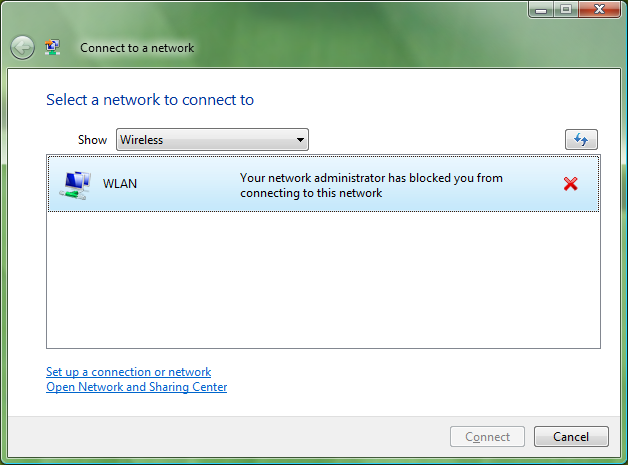
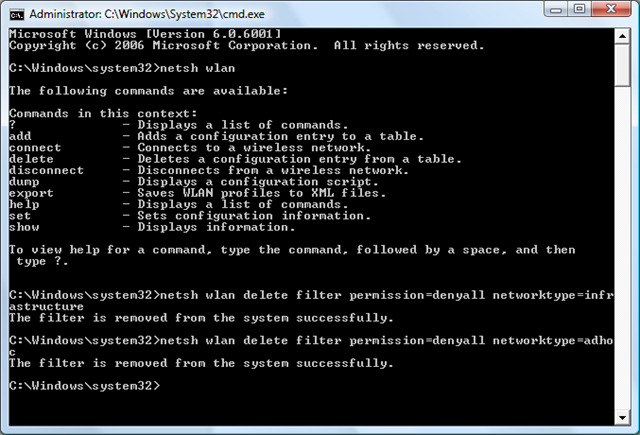
Yesterday I wasn't able to connect to my own WLAN. The day before yesterday I was able, but yesterday I got the message that my network administrator has blocked me from connecting to this network. "Your network administrator has blocked you from connecting to this network". blockedWLAN The ironic thing is that I am the network administrator of this network. :-) As I hadn't installed anything new on my machine, I wondered why my computer wasn't able to connect anymore. Then I remembered that I got a bluescreen due to my swisscom unlimited card. My computer awaked from sleep and didn't recognize the swisscom unlimited card anymore. I plugged-in the card again, and then I got a bluescreen. Unfortunately at this moment I was not in my home-wlan, so I didn't recognize that it didn't work anymore. So the question was how to unblock this WLAN. I didn't find any contextmenu or a Dialog to unblock it. So first I have deinstalled the software of the unlimited card. But that wasn't a helpful idea. My WLAN was still blocked. (Normally the software of the unlimited card (called unlimited data manager) can manage your WLANs, then you'll see them as blocked. But I didn't tell the software to manage my WLANs, so I thought deinstalling would help, but it didn't). After deinstalling the unlimited card software didn't help, I thought there's only a way like a real admin would do - by a commandline-tool that gives you a little bit of linux-feeling. Windows Vista contains a commandline-tool called "netsh" - the Network Services Shell. That tool was also shipped with XP and other Windows Operating Systems. Run that tool from the commandline with "netsh wlan" and you'll see the available commands for WLANs. I looked at http://technet.microsoft.com/en-us/library/cc755301.aspx, where you'll find all informations about administration of WLANs by netsh. There you'll also find the "delete filter" command, that was the solution to my problem. I've deleted the filters of denied infrastructure and adhoc networks by calling the following two commands in a cmd-Window with path to system32 >netsh wlan delete filter permission=denyall networktype=infrastructure
netsh wlan delete filter permission=denyall networktype=adhoc
Both times I got the message "This filter is removed from the system successfully". Here's the Console that shows what I've done. netshDeleteFilter After that step in the Console, my WLAN wasn't blocked anymore and I was able to connect again... puhh, however, I'm still still wondering that there isn't a GUI to unblock WLANs, even on a system called "Windows". ;-)
Read more...

How-to deploy the Crystal Reports Basic Runtime that’s included in Visual Studio 2008

This week I've to deploy an ASP.NET application containing about 20 reports that have been created with the Crystal Reports Basic Runtime which is included in Visual Studio 2008. (By the way, the application also contains a lot of AJAX-Functionality. It uses the "AJAX Control Toolkit-based" MultiColumnDropDown that I've described in a previous post). When deploying the application to a different machine than your developer-machine, the Crystal Report Basic Runtime must be deployed also. You do that by copying the necessary msi-file to the server and run it. The "necessary" .msi-file is already on your development machine and were installed with Visual Studio 2008. The .msi-files for different plattforms are located in the following paths:
Runtime | MSI-Location
(x86) C:\Program Files\Microsoft SDKs\Windows\v6.0A\Bootstrapper\Packages\CrystalReports10_5\CRRedist2008_x86.msi
(x64) C:\Program Files\Microsoft SDKs\Windows\v6.0A\Bootstrapper\Packages\CrystalReports10_5\CRRedist2008_x64.msi
(IA64) C:\Program Files\Microsoft Visual Studio 9.0\Crystal Reports\CRRedist\IA64\CRRedist2008_ia64.msi
(the table above is contained in MSDN-documentation here) The installation is very simple. You doesn't need to click anything, simply run the .msi and you see the window below. Just wait until it closes. crystalReportsBasic There's also the possibility to include the msi in your setup-application. For more information on that take a look at this thread in MSDN-Forums.
Read more...

VisualStateManager in Silverlight

Last year I've written a german article for the dotnet-magazine about VisualStateManager in Silverlight. As this feature will also be part of WPF 4.0, take a look at the article, which is now available on my homepage. The article is also available on the homepage of Trivadis beside many other articles focused on other IT-Topics. So read and enjoy. :-)
Read more...

The promised code example with the ASP.NET Ajax Multicolumn-Dropdown

During the last months I was asked many times for the code of the Multcolumn-Dropdown that I've described in this post. I've just created a very small sample-application containing such a dropdown. You can download it here. If someone of you creates a control out of that source, I would be glad to get a link to it. :-) Thomas
Read more...

The Lottery-Console-Application used at the last WPF-Event @ Microsoft Usergroup Switzerland

Last week we had a great WPF-afterwork-event at Microsoft Usergroup Switzerland (MSUGS) sponsored by Trivadis. I gave a deep-dive session about developing custom controls using WPF with many of it's features like Dependency Properties, Commands, Routed Events, PART-Elements, Theme-Styles and so on. (more…)
Read more...

Developing Multicolumn-DropDown/DropDownList with ASP.NET, the GridView and the AJAX Control Toolkit

During the last months I was developing an ASP.NET application and I needed a dropdownlist to display multiple columns in each item. Everyone with a little knowledge in Web-development knows, that HTML doesn't contain built-in support for multicolumn-DropDowns. (more…)
Read more...

WPF-book is now available in stores, maybe you win a free one @MSUGS

Since last week my German WPF-book is available in stores. You find more details about the book and some snippets of chapter 1 and chapter 14 on Galileo Computing. You can order the book on the Galileo Comuting-Website or on amazon.de and other stores. For any questions about the book, write a comment to this post or use the contact-form of my homepage. If you've already got the book, I'm looking forward to your feedback. What's going on next: Free MSUGS-Event about developing Custom Controls with the chance to win a WPF-book: On Wednesday, 20th August, you can visit a free event in cooperation with the Microsoft User Group Switzerland (MSUGS) about developing Custom Controls with WPF. The event will be in Zurich @Trivadis (Europastrasse 5). You find more details about the event here. At the end of this event, you can win one WPF-Book for free. WPF-Course @Trivadis: If you want to know more things about WPF-Programming, take a look at the 3-day WPF-course at Trivadis, which you find here. If you take this course, you'll get a WPF-book, the Trivadis course-material, and everything you need to become a rich & famous WPF-Programmer. ;-) DataAccess in the time of LINQ: Christoph Pletz and I are working on a TechnoCircle - a one day event you can visit in the second half of this year @Trivadis - about DataAccess in the time of LINQ. This TechnoCircle does not only show you how LINQ works, it shows how to implement a Data Access Layer in the time of LINQ in a Three-Layer-Architecture. It also discusses the usage of LINQ to SQL vs. Entity Framework vs. DataSets etc. As soon as you can register for the TechnoCircle, you'll find more infos on the Trivadis-website and of course here on my blog...
Read more...